Your Superlemon Dashboard Just Got Cleaner
SuperLemon Team
1 min read

- +90% open rate on WhatsApp
- Recover abandoned carts automatically
- Send Broadcast Campaigns
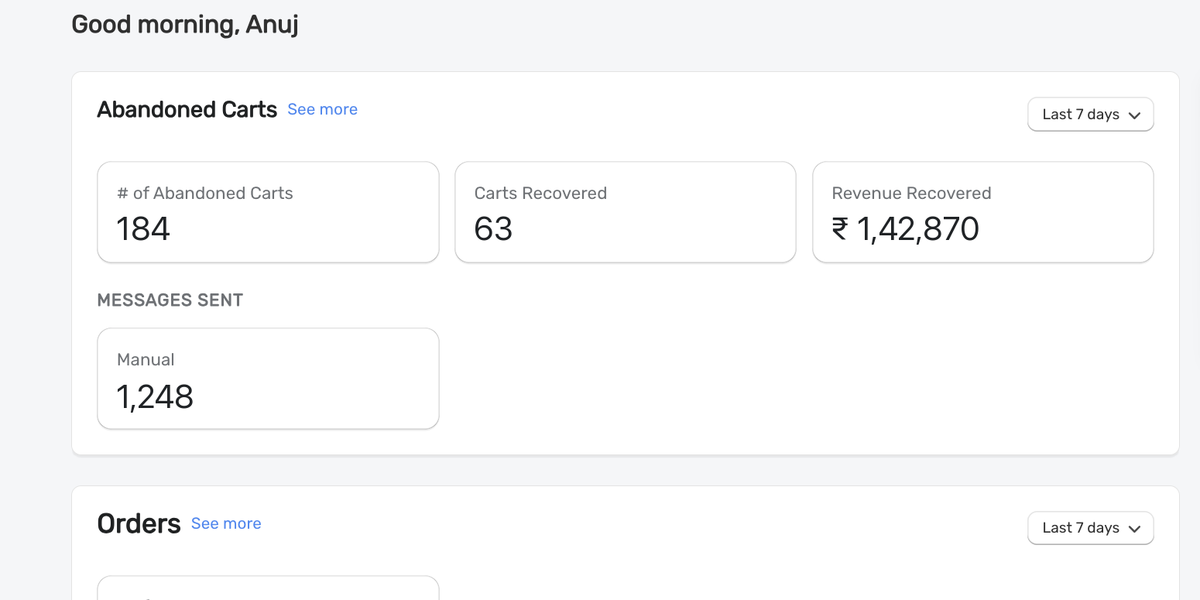
The Superlemon home screen didn't used to show you any data when you logged in. Now it does.
What's on the home screen now
Your messaging stats are broken into three sections: Manual Messaging, Automated Messaging, and Widget Analytics. Each one is separate, so you can see how each part of the tool is doing without having to dig through the app.
We picked what we think is the most useful information to show there. Your most important data is available the moment you land on the dashboard. We'll keep improving what we surface as we get more feedback.
Shareable analytics views
The analytics tabs are now URL-synced. When you switch to a specific view — like Automated Messaging for the last 30 days — the URL updates to match. You can bookmark it or share it with a teammate and they'll land on exactly that view.
Log in to Superlemon and check your home screen.


