Every Campaign and Automation Now Shows What It Sold
SuperLemon Team
4 min read

- +90% open rate on WhatsApp
- Recover abandoned carts automatically
- Send Broadcast Campaigns
You Could See Delivery. Not Dollars.
Nearly 70% of online shopping carts get abandoned before checkout. That number comes from Baymard Institute's review of 48 separate studies, and it hasn't moved much in years.
Superlemon built Abandoned Cart Recovery and other WhatsApp automations to win some of that back. But until now, you could only measure the messaging, not the money. You could see if a message got sent, delivered, read, or clicked. You could not see if it led to a sale.
That's fixed. Every automation and every campaign now shows the orders and revenue it earned, right next to the numbers you already track. Open Automations in your dashboard and you'll see it live.
Abandoned Cart Recovery, By the Numbers
Here's what that looks like in a real store. Each automation step, the 15-minute Abandoned Cart Recovery reminder, the flexible follow-up, order updates, shipping alerts, now lists Orders and Revenue next to Sent, Delivered, Read, and Clicked.
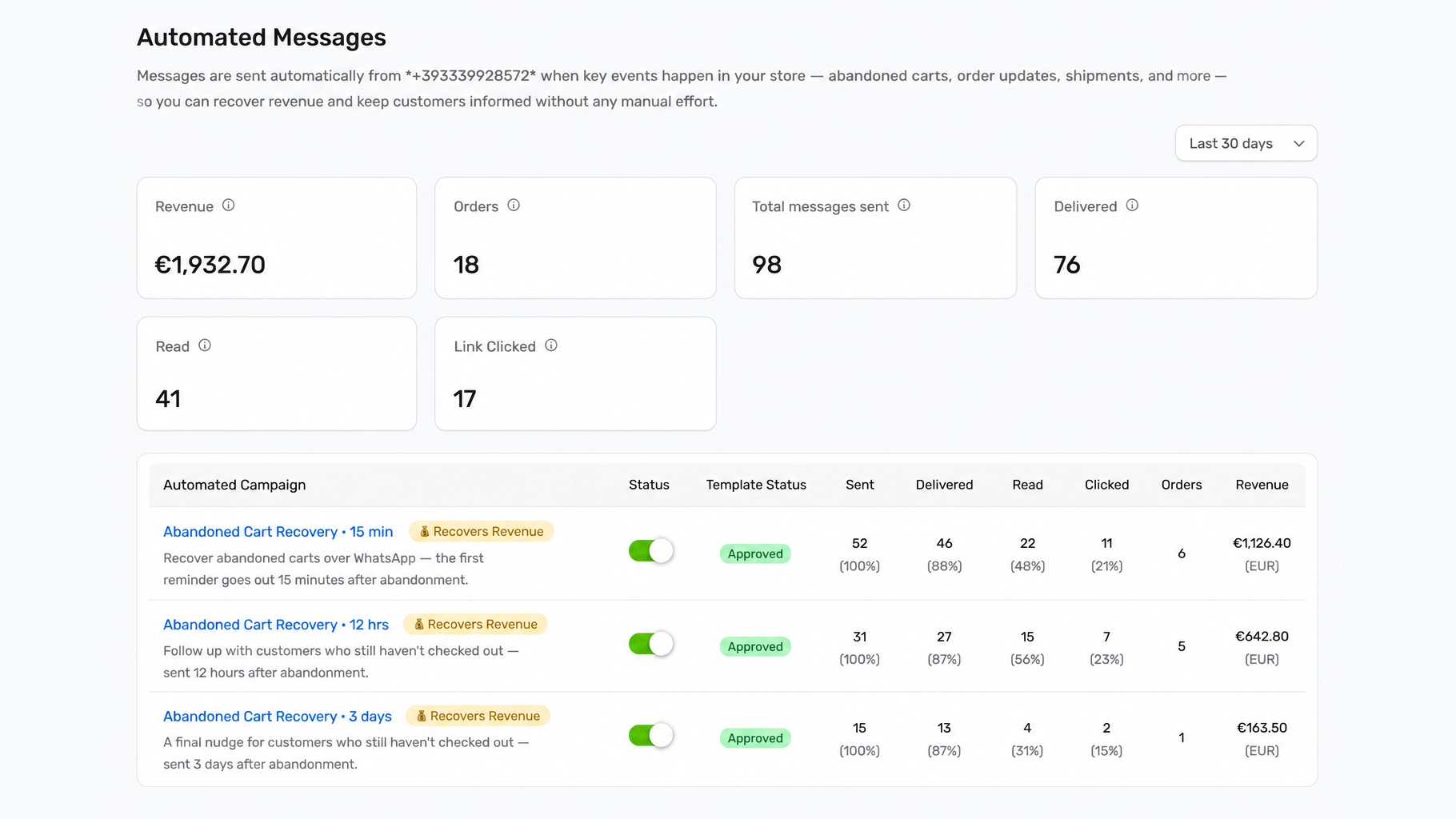
In the example above, the 15-minute Abandoned Cart Recovery step sent 52 messages and earned EUR 1,126.40 across 6 orders. The 12-hour follow-up added another EUR 642.80 from 5 orders, and the 3-day nudge picked up one more order worth EUR 163.50. Your account shows the same breakdown, automatically, with no setup.
Campaigns Get the Same Treatment
More than 200 million businesses use WhatsApp Business every month, according to Meta's own figures. Most of them can tell you whether a broadcast got read. Few can tell you whether it made money.
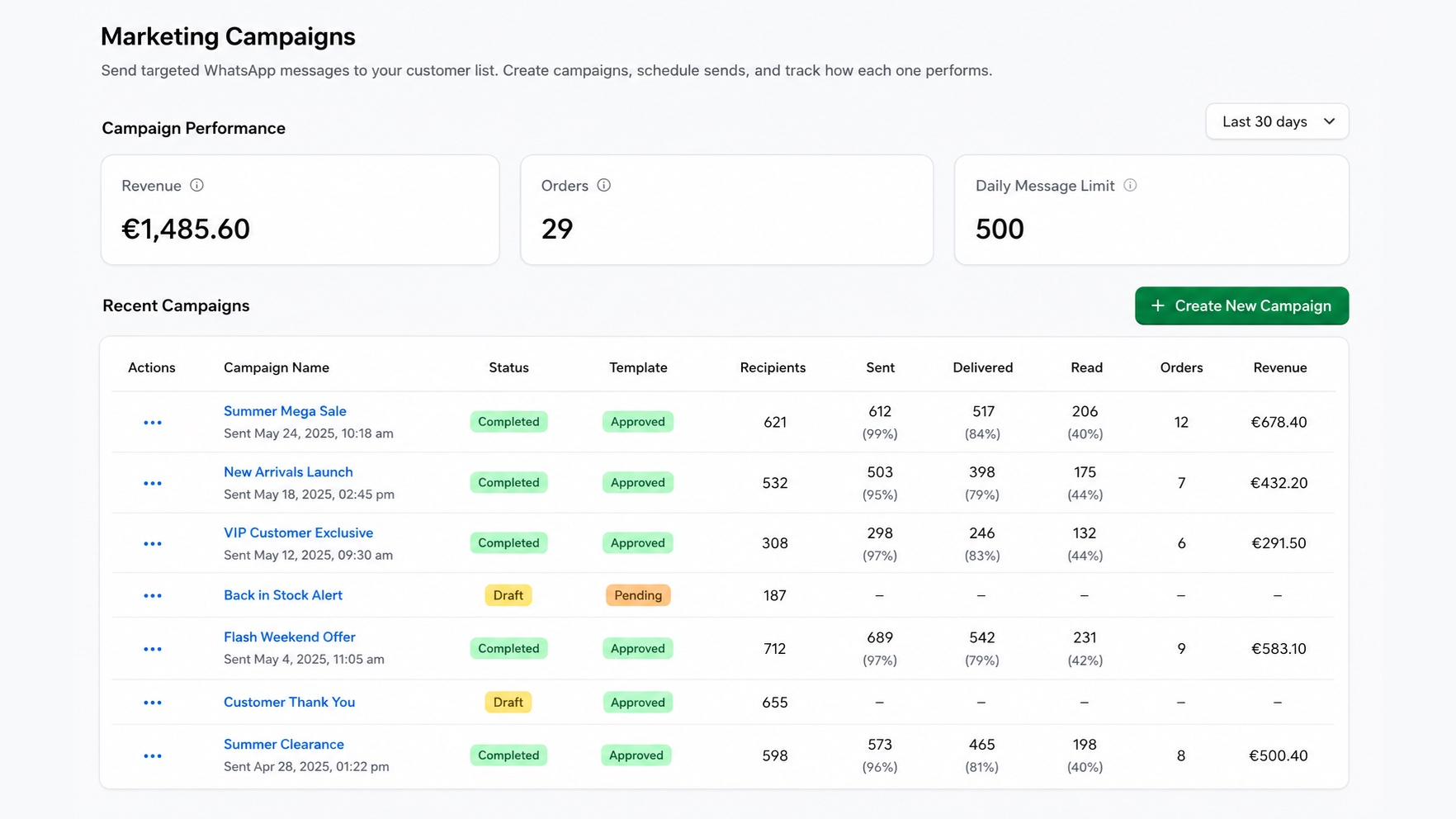
Every campaign in Superlemon you send now carries its own Orders and Revenue column. You can see which sends made money, not just which ones got opened.
Reads Don't Pay the Bills
Open rate alone can mislead you. WhatsApp messages already open at rates near 98% by some industry estimates, far above email. A high read count on its own tells you less than it used to. Revenue tells you what actually worked.
In the campaign list above, Summer Mega Sale earned EUR 678.40 from 12 orders, the strongest revenue in the batch, even though its 40% read rate trailed VIP Customer Exclusive's 44%. Read rate told you which campaign got opened. It didn't tell you which one paid for itself.
Open Marketing Campaigns and check the Revenue and Orders columns on any past send.
One Number for the Whole Store
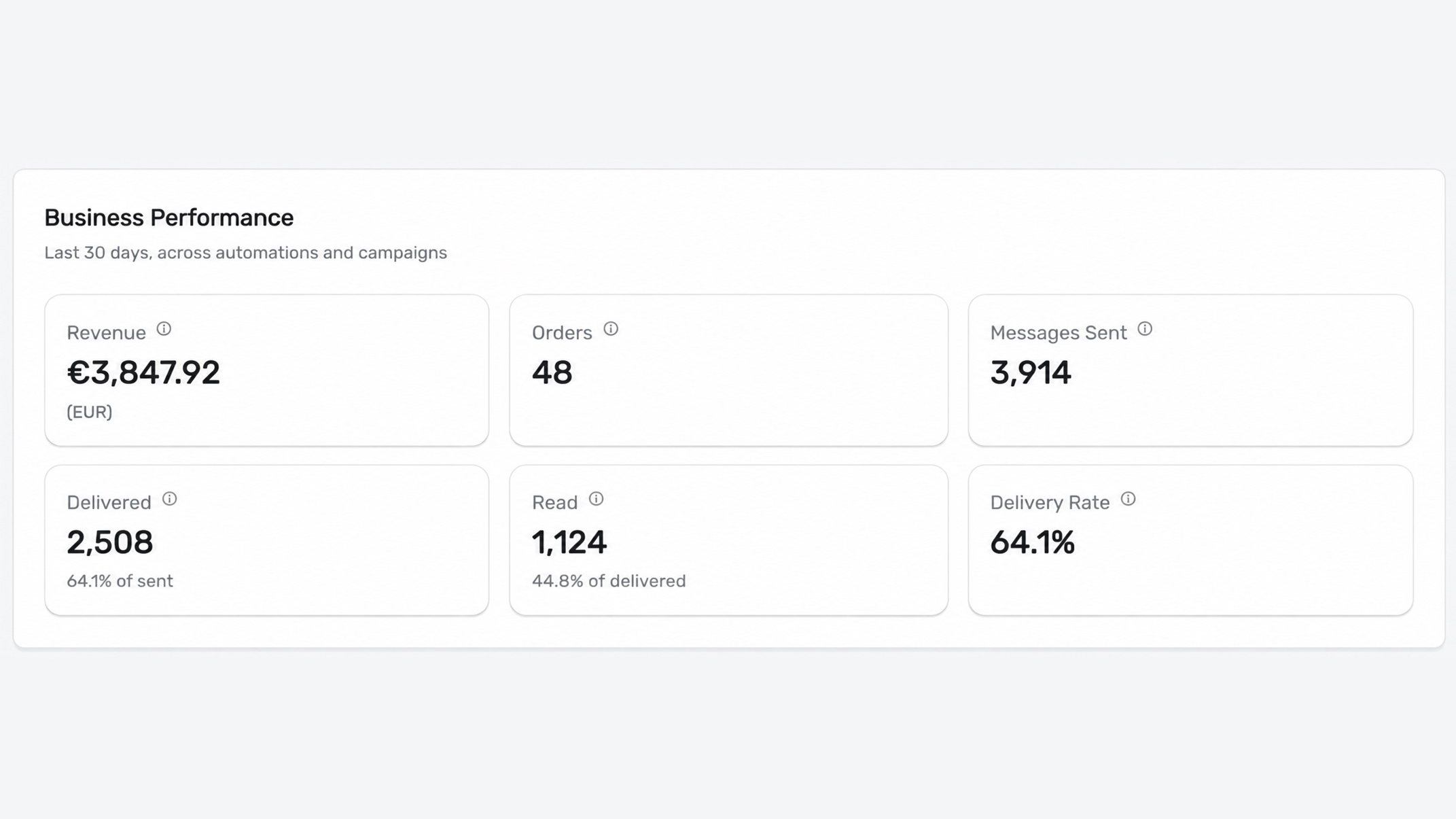
We have added a new Business Performance panel to the top of your dashboard. It combines automations and campaigns into one view, with total revenue, orders, and messages sent for the period, plus delivery and read rates.
What This Looks Like at Scale
Outside research points the same direction. One analysis of WhatsApp Business ROI put revenue per contact at 2 to 4 times what email delivers, with return on ad spend often landing between 5x and 12x. Now you can check where your own store lands, in your own dashboard, with your own numbers.
This makes Superlemon even better for your store. You could always see who read a message. Now you can see who bought because of it.
Frequently Asked Questions
What counts as revenue in these reports?
Revenue and Orders count sales placed within your attribution window after a customer receives that specific automation or campaign message. The default window is 14 days.
Can I change the revenue attribution window?
Yes. You can set it anywhere from 1 to 14 days. At 7 days, for example, Superlemon only counts an order as revenue if the customer completes it within 7 days of receiving that campaign or automation message.
Do I need to set anything up to see this?
No. Log in to your Superlemon dashboard and open Automations or Marketing Campaigns. The Revenue and Orders columns are already there.
Where do I see the combined total across automations and campaigns?
Open your Superlemon dashboard home. The Business Performance panel at the top adds automations and campaigns together and shows total revenue, orders, and messages sent for the period you select.
Can I see revenue for one automation step, not the whole automation?
Yes. Each step, like the 15-minute Abandoned Cart Recovery reminder or the 3-day follow-up, lists its own Sent, Delivered, Read, Clicked, Orders, and Revenue.
Can I see revenue for a single campaign?
Yes. Each campaign in Marketing Campaigns lists its own Orders and Revenue, next to Recipients, Sent, Delivered, and Read.
What currency does revenue show in?
Whatever currency your store sells in. The examples above show EUR because that's the store's currency. Your dashboard shows yours.