Send a Test Before You Broadcast — New in Campaigns
SuperLemon Team
3 min read

- +90% open rate on WhatsApp
- Recover abandoned carts automatically
- Send Broadcast Campaigns
WhatsApp campaigns get read. Open rates run around 95-98%, compared to 20-25% for email. Click-through rates follow the same gap: roughly 45-60% on WhatsApp versus 2-3% on email. Superlemon customers send campaigns to thousands of customers every week — flash sales, restock alerts, discount codes — and for most of them it's the highest-ROI channel they run.
Which is exactly why a broken campaign stings. You hit send to 3,000 people, and three minutes later someone on your team messages you: "The discount code is showing as {{discount_code}} — not the actual code." You find out from the replies. The campaign has already gone out.
What Goes Wrong
WhatsApp campaigns use approved templates with variable placeholders: customer name, order number, discount codes, URLs. A misconfigured variable mapping means the placeholder shows up in plain text. A broken media attachment doesn't render. A CTA button that links to the wrong page sends customers somewhere they weren't supposed to go.
Until now, there was no way to see what any of this actually looked like in a real WhatsApp conversation before sending. You were reviewing inside the Superlemon dashboard and hoping everything resolved correctly on the other end.
Send Test
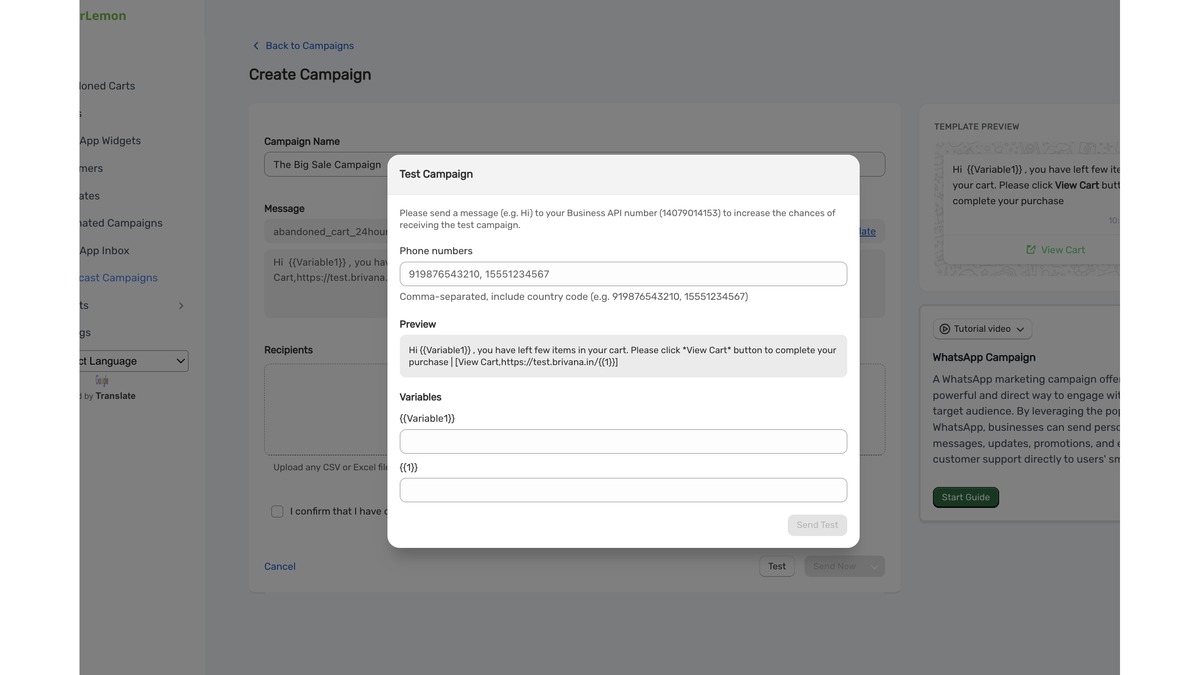
Before you schedule or send any broadcast campaign, you can now click Send Test and deliver the actual message to any WhatsApp number you choose — your own, a colleague's, anyone on your team. What you receive is the real message: the template rendered, variables substituted with live data, media loaded, buttons active.
If the discount code is still sitting there as a placeholder, you catch it on your phone before anyone else does.
What to Check
The test covers everything in one shot: whether variable placeholders are resolving to the right values, whether images and PDFs load correctly, whether call-to-action buttons link where they're supposed to, and whether the message reads well on an actual phone screen.
It also makes sign-off quicker. Before a big promotional send, forward the test to your manager or marketing lead so they can review it from their WhatsApp, not a preview window.
A Few Details
The feature works with all approved templates on both one-time and scheduled campaigns. The Send Test button is in the campaign builder before Schedule or Send, so it's part of the normal flow.
Head to Broadcast Campaigns → Create Campaign and look for the Send Test button before you schedule.
If you have any questions about how we can help increase your sales through WhatsApp campaigns, reach us at support@superlemon.xyz.