Trigger WhatsApp Messages Directly from Shopify Customer Segments
SuperLemon Team
3 min read

- +90% open rate on WhatsApp
- Recover abandoned carts automatically
- Send Broadcast Campaigns
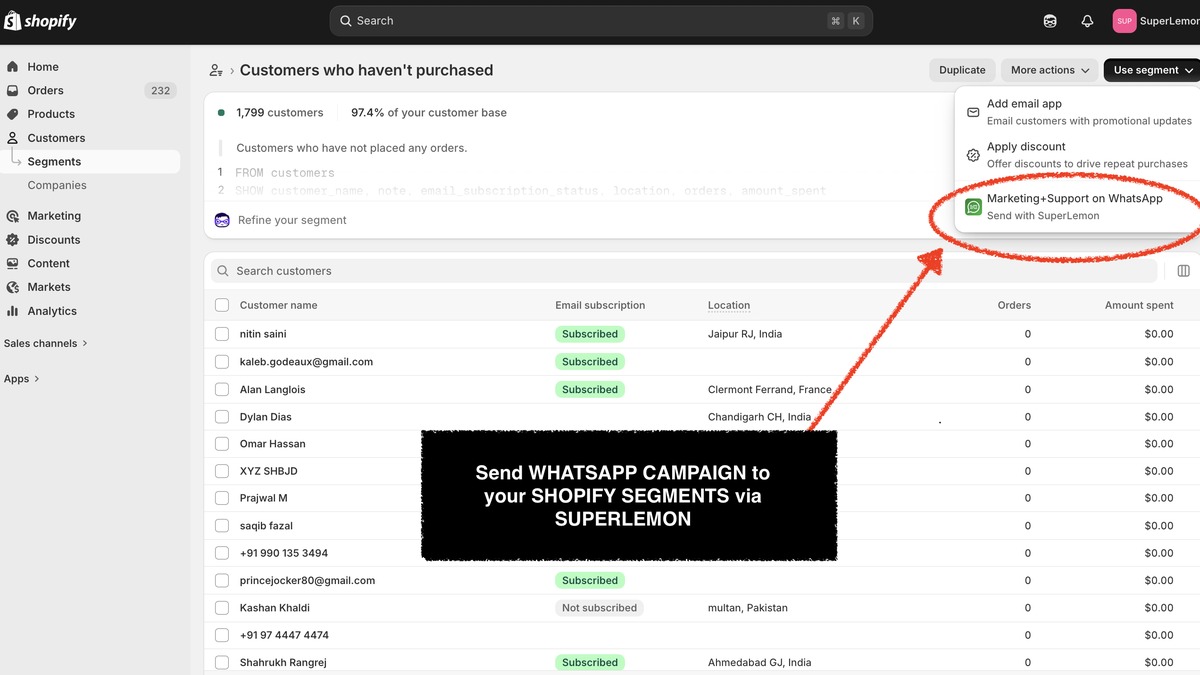
Shopify's customer segments can get specific. Purchase history, product interest, location, lifetime value, custom tags — you can filter down to exactly the customers you want. The problem has always been what happens after.
To send those customers a WhatsApp message, you had to export the segment as a CSV, import it into Superlemon, match the phone number column, and rebuild the audience there from scratch. It worked, but it added 15 to 20 minutes of setup to every campaign. For time-sensitive outreach — a flash sale, a back-in-stock alert — that lag was a real cost.
We've just shipped something that removes that step entirely.
Superlemon in the Shopify segment Actions menu
Superlemon now shows up as a native action inside Shopify's customer segment views. Open any segment, click Actions, and you'll see Superlemon listed alongside Shopify's own options. Pick one of your approved WhatsApp templates and send. The message goes to every customer in that segment — the exact filtered list Shopify computed, not a cached export from three days ago.
There's no new setup on the messaging side. The templates you already use work here. If you have approved templates in Superlemon, this feature is ready to use the moment you update the extension.
The filter you see in Shopify is the audience that gets messaged. If a segment has 180 customers, 180 customers get the message. No data lost to a format mismatch, no audience drift from a stale export, no columns to remap.
What this makes easier in practice
For re-engagement campaigns, the workflow that used to take 20 minutes now takes two. Build a segment of customers who purchased between 60 and 120 days ago, click Superlemon in Actions, pick a template, send. The segmentation does the work it was already doing — now the messaging follows directly from it.
The same applies to product-specific follow-ups, outreach to customers filtered by lifetime value, or any segment you're already running. The data stays in Shopify; the campaign sends from Shopify. English and French are supported at launch, with more languages coming.
How to get started
If you have the Superlemon app installed, this feature is already available to you — no additional setup. It's part of the campaigns functionality, so it requires the Scale plan.
Shopify's segmentation is one of its real strengths, and we built this integration specifically to take advantage of it. Getting a WhatsApp campaign out to a precise audience should be a two-click operation, not a 20-minute data migration.
If you're running a Shopify store and want to send WhatsApp campaigns directly from your customer segments, write to us at support@superlemon.xyz — we'd be glad to help you get set up.